


Transcript request – 2005 onwards
All transcripts for Okanagan College (September 2005 onward) are requested online through our registrar's office.
Step-by-step instructions: for Okanagan College students (Sept 2005 onward)
All official Okanagan College transcripts are requested through your myOkanagan account. Transcripts are sent by Canada Post regular mail and not by email.
Each student transcript costs $10. If you don’t complete the payment, your transcript request will not be processed.
For help with your myOkanagan password or login issues, contact Okanagan College IT Services.
Instructions for transcript requests:
On a mobile device:
Step 1: Go to “my.okanagan.bc.ca” and sign in
Step 2: Follow the “On a desktop” steps
On a desktop:
Step 1: Log into your myOkanagan account
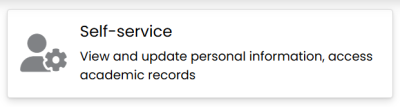
Step 2: Go to “Self-service”
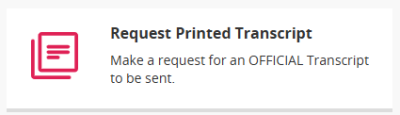
Step 3: Select “Request Printed Transcript”
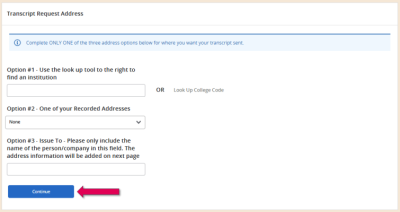
Step 4: Choose only one of the 3 options
Enter the information
Click “Continue”
- Home address: On Option #2 select your home address and click "Continue"
- Other institutions: On Option #1 click "Look up college code" for listed institutions. If not listed, go to Option #3 and enter the institution's name. Click "Continue.
Step 5: Select Transcript Type
Confirm if address is correct or add the address.
Click “Continue”

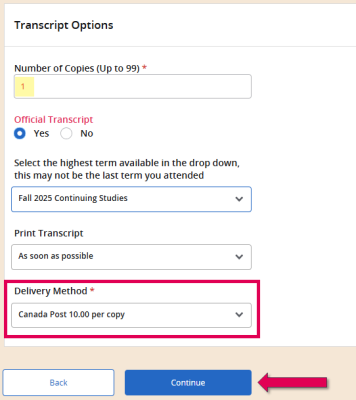
Step 6: Enter Number of Copies.
Select Delivery Method
Click “Continue”
Step 7: Review Transcript Request Summary
Click “Continue”

Step 8: Submit a payment of $10 per transcript through PayMyTuition.com. Please note that PayMyTuition applies an additional convenience fee.
Your official transcript will be printed and mailed on the next business day. We do not fax, email or courier official transcripts.
Related questions
Can you email my transcript emailed?
Okanagan College is not yet part of the electronic transfer system. Therefore, all transcripts are printed and mailed the next day via Canada post regular mail.
If you need a faster option, you can request an official transcript for yourself and then scan it as a PDF to send electronically.
How can I get my unofficial transcript?
You can get your unofficial transcripts through your myOkanagan account. Just go to the "Student records" tab and select "View/print unofficial transcript.
The institution never received my transcript. What can I do?
Once Okanagan College has printed and mailed your transcripts, your request is complete. For delivery information, you can contact Canada Post directly (as we do not have tracking numbers). If you need another transcript, you will have to request and pay for it again.
Can I pick up my transcript in person?
If you’d like to pick up your official transcript in person, you’ll need to place your order directly at the Registration Office on the Kelowna campus. Once payment is made, a staff member will print your official transcript and provide it to you in a sealed envelope.
I tried to order a transcript, and I just found out that I have a financial hold on my account. What can I do?
If there’s a financial hold on your account, you’ll need to pay the outstanding fees. Once the payment is processed, the hold will be removed, and you can request your official transcript.
Resources and links
IT Services | Okanagan College
Registrar's Office | Okanagan College
If you have academic history at both Okanagan College and Okanagan University College, request your transcript through your myOkanagan account. You’ll receive a complete transcript that includes records from both institutions.