


New and Returning Students
Welcome to Okanagan College!
Whether you're starting your first term or returning to continue your studies, all students will receive a Welcome Email with important account information before the term begins.
Check Your Inbox for Your Welcome Email
Your Welcome Email will include:
- Your OC student email address
- Instructions to activate your account (first-time students)
- Steps to reset your password (returning students)
- Helpful login and support information
Tip: The email will be from "OC-DO-NOT-REPLY@okanagan.bc.ca" with the subject "Accessing Your Okanagan College Account" Be sure to check your personal email account (the one you applied with). If you don’t see it, check your junk/spam folder. Please save this email, as it contains your OC account details for future reference. Remember to check your OC email regularly — important College updates will be sent there.
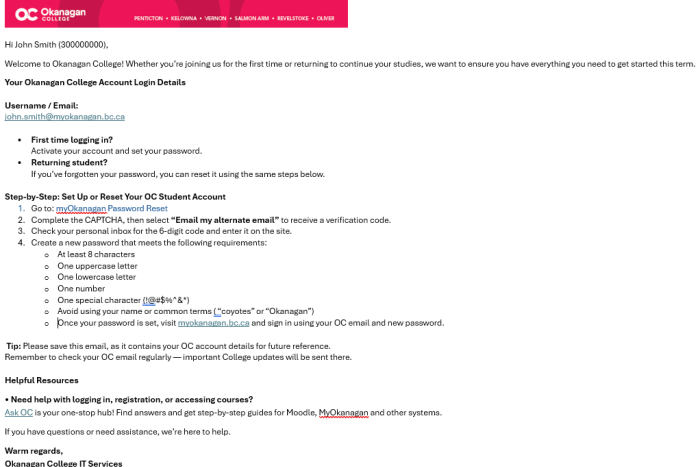
Step-by-Step Instructions
Step 1: Go to: myOkanagan.bc.ca
Step 2: Log in with your college email address, usually in the form: firstname.lastname@myokanagan.bc.ca
Step 3: Select "Forgot password?"
Step 4: Complete the CAPTCHA, then select “Email my alternate email” to receive a verification code.
Step 5: Check your personal inbox for the 6-digit code and enter it on the site.
Step 6: Create a new password that meets the following requirements:
- At least 8 characters
- One uppercase letter
- One lowercase letter
- One number
- One special character (!@#$%^&*)
- Avoid using your name or common terms ( “coyotes” or “Okanagan”)
- Once your password is set, visit myokanagan.bc.ca and sign in using your OC email and new password.
FAQs
Q1: How long does it take for an account to be approved?
A1: Accounts are approved within 1-2 business days.
Q2: Can someone from my team access the app and our job postings?
Q2: Yes, they enter the same Employer name linked to your organization.
Resources and links
- • Need help with logging in, registration, or accessing courses?
Ask OC is your one-stop hub! Find answers and get step-by-step guides for Moodle, MyOkanagan and other systems. - If you have questions or need assistance, we’re here to help.